
How to Use Therapy Games on Zoom (and Similar Video Platforms)


Maybe you’ve been providing telehealth for a while and are looking for a way to add more interaction to your online sessions. Or perhaps you’re new to the idea and aren’t sure how to engage clients, especially teens, kids, and groups. Not to worry, there are many ways to make your online therapy sessions more fun, interactive, and effective.
It’s likely easier than you think to use therapy games on Zoom, and similar platforms like Simple Practice or Doxy. The steps vary a bit by platform, but once you get the basic concept you’ll be on your way.
Would you go over the technical aspects first or dive into the best therapeutic activities to use online? To learn more about the technical steps of using therapy activities on Zoom, keep reading. Once you’re ready to get to it, skip down to some of the more therapeutic and tech-safe activities to consider for virtual therapy.
How to Run Therapy Games on Zoom
Let's get started. There are four common ways to use online therapy activities in Zoom, and three of them overlap closely with other telehealth platforms. I’ll go into some of the platform-specific differences in the next section.
Option 1: Share your Zoom screen and run the activity from your side
This method works best for Zoom therapy games like therapy prompt Jeopardy or Tumbling Prompts (more on that later), where you control the game and your client makes most choices. It still feels very interactive, even though you’re the one using the mouse. Here’s how it would work.
While in your Zoom session (you and your client are already present), click the “Share Screen” button at the bottom.
Choose “Share Browser.” At first, this may trigger a temporary, slightly bizarre effect where it shows mirrored versions of your screen. (My clients usually think it’s fun.)
Once that’s up, open the browser/screen with the activity you want your client to see. I usually ask, “What do you see now?” just to make sure we’re on the same page.
From there, you can run any interactive therapy activity from your browser while your client observes and participates.
Most video platforms work similarly. Just look for a “Share Screen” option and follow the prompts (or skip ahead to platform-specific tips).
Option 2: Have Your Client Share Their Screen (Recommended for Telehealth)
This is the method I use most often for online therapy tools and activities. It’s essentially Option 1, but from your client’s end.
I particularly like this for using Online Therapy Tools, since this platform allows you to send a private link so clients aren’t navigating to a public site.
Using the Zoom or other platform chat button, send your client the link to the activity (ideally a secure, non-public link like through Online Therapy Tools).
Have them return to Zoom and click “Share Screen.”
You client will choose the browser/screen with the activity and you’ll be able to observe everything they’re doing.
They get to fully control and interact with the activity while you observe, guide, and process alongside them. I love this option for kids and teens because it just about requires them to stay engaged with you and the session on screen.
Option 3: Allow Your Client to Take Over Your Mouse in Zoom
This can be helpful if you want to avoid your client opening their own browser or taking extra steps. Honestly, it’s not my personal favorite. I find there’s sometimes a lag, and I’m not always keen on handing over control of my screen and computer.
That said, many therapists find it useful, and it can be a good option if you’re thinking about privacy or HIPAA considerations, although there are some other interactive options that are still more safe and secure.
Option 4: Share with Words, Not Screens
Sometimes, due to connection issues or platform limitations, screen sharing just isn’t an option. It’s not my favorite situation, but I’ve still had very meaningful telehealth sessions this way.
In these cases, I use activities the client can describe. For example, if we’re playing Humans Against Stress through Online Therapy Tools, I’ll still send the link for the game. Then I’ll have the client describe the cards they see, and we process them together. It feels a little bare on my end, but they’re still engaging with the activity.
I do this with expressive activities too, like online sand tray therapy tools. The client gets the full experience and then explains what they created. It can actually add more value. They often go deeper in their descriptions, as if they’re truly “teaching” me, and I’m less likely to accidentally misinterpret something or jump to conclusions about meaning from my side.
Option 5: Use Non-Tech Backups
If tech fails completely, or you end up on the phone instead, it helps to have a few backup ideas ready for telehealth therapy sessions. I’ll often ask clients to grab paper and draw from prompts, or we’ll play simple verbal games like “I Spy” to practice mindfulness.
If they’re on video, they can show what they’ve created. And if they’re Zooming from their room, that’s a gold mine, especially with kids. Many love giving a “tour,” showing favorite objects, or explaining how their space is set up. I’ve gotten to know a lot of precious stuffies this way. Honestly, I often learn more about my clients from a kid’s room tour than a standard assessment.
Best Therapy Game Types for Zoom & Online Platforms
Now that you know HOW to use therapy games on Zoom, which ones are best? The final criteria is up to you and your clients, but here’s what I have found important.
Therapy-specific games. While there’s certainly some value to playing general games in sessions, I like therapy specific games that have certain goals in mind or focused prompts. With these I can tailor the activity to goals we’re working on, such as building rapport, learning about coping skills, or practicing mindfulness. Many therapy games follow basic game concepts like those in Jenga or board games, so they’re still easy and familiar for clients.
Private sites. I know many people use public game sites where they can meet up with their clients and play basic games, but I have always had concerns about this. First, if you’re using a public site you are letting your client loose in a new environment that may not be therapy-minded. Second, most public sites have advertising or other marketing aspects like asking or requiring an email from your client. Third, there could be some HIPAA concerns if it becomes apparent that your client is visiting there (or meeting you) during a therapy session, or if the website is storing their data and interactions. Instead, I like to use private but convenient platforms like Online Therapy Tools where they’re not going to run into anyone else during our session.
Low pressure activities.
Why play games versus traditional discussion in the first place? I often use therapeutic games like Humans Against Stress, which is basically a set of challenges and coping skills in a game format. If I were to simply say to a client or therapy group that we were going to read through challenges and discuss coping skills today I would likely get some groans (or at least they’d grown internally). But when we make it a game with a physical or virtual card deck that shuffles itself, suddenly it becomes a fun and novel escape from the every day.
4. Open ended prompting.
No matter what therapy game or activity I’m using, the process goes beyond the basic steps of the game. For example, in therapy Jenga or other tumbling block games, a client might read and answer a prompt like, “Where would you most like to go with your family?” I might follow that up with, “Who do you get along best with in your family?” or “Why do you think you would enjoy that trip?” The therapeutic process is still there. It’s just in a more natural, gentle emotional environment.
As you can see, the best types of activities for telehealth are similar to in-person therapy. You just want to consider a few extra aspects like ease of use online and privacy in the space.
Therapy Games You Can Play Online via Zoom and Telehealth
Ready for the nitty gritty now? There are a wide range of specific online therapy activities you can use in Zoom or other telehealth platforms. Many are designed with virtual sessions in mind, which makes it easier to keep clients engaged and interacting in a natural way.
Below are some of the most popular therapy games that translate well for online sessions.
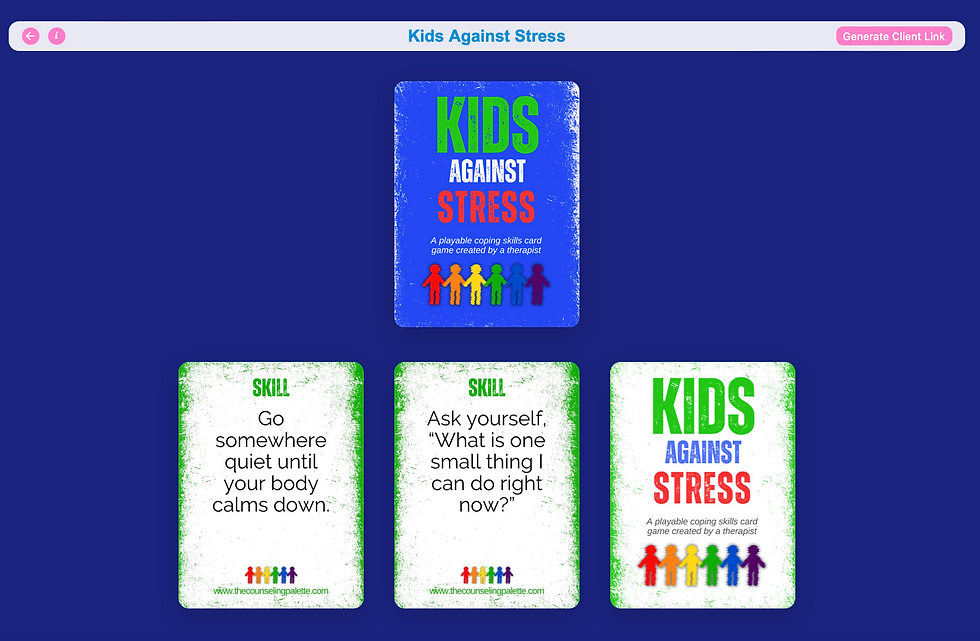
Humans Against Stress / Kids Against Stress Cards
These are some of the more popular card-based therapy activities in online platforms like Online Therapy Tools. They follow a simple format: a scenario is paired with different responses, and the client chooses the one they relate to most (or find most entertaining). That choice becomes the starting point for discussion.
For online use, you can:
Share your screen and go through the cards together
Or have your client open the activity and share their screen
Even though the format is playful, it leads easily into meaningful conversation:
“Which one feels most like something you’d actually do?”
“Which response would actually help?”
“What would your version of this be?”
The humor lowers defenses, especially with teens, while still giving insight into coping patterns. You can use the activity as a general discussion game, or even play against each other for points.
Virtual Tumbling Prompts (Jenga-Style Game)
A digital tumbling blocks-style game adds movement and unpredictability to telehealth sessions, which can otherwise feel a bit static. Each block connects to a prompt (warmup, coping skills, CBT, DBT, emotions), or you can run it without prompts and guide things yourself.
The game runs with a secret trap block and winning block, so clients are searching for the winning blokc while playing. This gives the game a natural arc and keeps clients invested. It also means rounds are fairly quick, so you can play multiple games in a single session without it dragging. The randomness helps it feel more like a game and less like a series of prompts.

Virtual / Online Sand Tray (Two Options)
Virtual sand tray tools recreate expressive play in an online format, allowing clients to build scenes and explore emotions visually.
Basic Drag-and-Drop Sand Tray
Simple and easy to use
Works well on mobile or with younger clients
Good for quicker or more straightforward sessions
Has some simple drawing features
3D Interactive Sand Tray
Allows digging, moving, and shaping realistic sand
Clients can bury and uncover items
Creates a more immersive, layered experience
Includes custom sand colors, background, and more robust miniatures
Both can be used:
Open-ended
With prompts or themes
As part of a larger activity or discussion
Although not technically a game, I find mixing expressive activities and games works great for online therapy sessions.
Jeopardy-Style Therapy Games (Online or PowerPoint)
Jeopardy-style games are one of the most effective ways to combine structure, engagement, and psychoeducation in telehealth.
They can be run either through:
PowerPoint (no browsers needed) like many of the games found here
Or built-in online versions (no app is needed) like at online platforms
The Jeopardy games are organized into categories with increasing point values, but instead of trivia, they focus on things like:
Emotional awareness
Coping strategies
CBT concepts
DBT skills
Some examples of themes at sites like Online Therapy Tools include:
Big Feelings (exploring emotions and how they show up)
Attacking Anxiety (understanding and responding to anxious thoughts)
Look, It’s Focus Kid! (attention, impulse control, and ADHD-related skills for kids)
What makes these work well in therapy is that they don’t have to be “right or wrong.” The prompts can be:
Open-ended
Discussion-based
Or gently guided with suggested answers
You can let the client choose categories and stay in control or guide the flow yourself depending on the session. They’re especially useful when you want a clear structure for the session, to introduce or reinforce skills, or to keep things moving with clients who lose focus easily
Therapy Bingo Games
Bingo translates extremely well to online therapy sessions, especially when it’s built specifically for therapeutic use.
In digital versions like the one at Online Therapy Tools:
Each client gets their own digitally randomized card
Each square brings up a prompt (rather than just a number)
Cards are interactive and can be marked off directly online
This means clients can stay fully engaged on their own screen while you guide the session. You can use it in a few ways:
Play toward a traditional Bingo (row, column, blackout)
Or use it more flexibly as a structured prompt board
As clients mark spaces, they respond to prompts related to:
Coping skills
Emotions
Reflection questions
Behavioral patterns
This works particularly well for:
Kids and teens who like clear goals
Clients who benefit from visual structure
Sessions where you want steady pacing without pressure
It keeps things moving, but still allows space to slow down and explore responses more deeply.
Drawing / Pictionary-Style Activities
Drawing-based activities are simple but highly effective in telehealth.
You can use:
An online drawing canvas at virtual platforms like this one
Or paper at home, with the client showing their work on screen
This works well for:
Kids and teens
Clients who struggle to verbalize emotions
Creative or expressive sessions
You can run it as:
Pictionary-style guessing games
Emotion drawing
Scenario-based drawing
It naturally leads into discussion without feeling like direct questioning, and often gives you more insight than a verbal response alone. Some online apps even include warmup and therapy prompts within the platform.
Tips for Using Therapy Games on Different Telehealth Platforms
Most telehealth platforms work similarly when it comes to running online therapy activities, but there are a few differences that can affect how smoothly things go. Below are some quick tips for common platforms alternative to Zoom.
SimplePractice
SimplePractice has a built-in telehealth feature with screen sharing, but it might feel limited compared to Zoom.
Tips:
Use the screen share button inside the video session to run activities from your browser
If something feels laggy, switch to having the client share their screen instead
Some interactive tools work better if the client opens them directly rather than watching you run them
If you find yourself troubleshooting often, many therapists will run sessions through Zoom and use SimplePractice just for scheduling and documentation.
Doxy is very simple and reliable, but it has fewer built-in features.
Tips:
Screen sharing is available on some plans, but not all, so check your version ahead of time
If you don’t have screen share, use the “send link + describe” method (client opens and you guide)
Keep a few low-tech backups ready just in case
Doxy works best when you keep things simple and flexible.
Carepatron
Carepatron includes telehealth features and tends to function similarly to other all-in-one platforms.
Tips:
Use built-in screen sharing if available, but test it ahead of time
Have clients open activities on their own device when possible for better interaction
If you’re running multiple tools, it can help to keep everything in one browser tab before sharing
BetterHelp
BetterHelp is more structured and doesn’t always allow the same flexibility as independent platforms.
Tips:
Screen sharing options may be limited depending on the session format
Often works best to send links and guide verbally rather than relying on shared control
Choose activities that don’t require a lot of clicking or setup on your end
This is one of the platforms where simpler activities tend to work best.
Grow Therapy
Grow Therapy sessions may use integrated video or third-party tools depending on setup. I will warn you that the screenshare from both sides can be glitchy, so you might want to consider backups like having your client open the browser and describe their view but not screenshare.
General Tips That Work Across Platforms
No matter which platform you’re using, these tend to make things go more smoothly:
If the activity is laggy, switch to having the client share their screen
If your client is having trouble, switch to sharing your screen
Keep instructions simple (“Click this link, then share your screen”); for young kids, have parents set it up the first couple of times
Have an alternative plan (like having them describe their view) in case screenshare isn’t working
Have non-tech backups in case nothing is working
Test new activities ahead of time when possible
Most of the time, the exact platform matters less than how you run the activity. Once you get comfortable switching between these options, you can make almost any online therapy game or tool work for virtual sessions.
Well, if you thought Zoom therapy was boring and limited compared to in-person work, now you know! There are many options to incorporate fun and effective therapy activities into the virtual space. I’m happy to answer any questions or give tips as needed, so get in touch! Meanwhile I’d recommend starting with Online Therapy Tools to see what options are the best fit for you.

About the Author
Jennie Lannette Bedsworth is a licensed therapist and the creator of The Counseling Palette, a trusted source for therapy games, group therapy activities, and printables. With two decades of experience in the mental health field, Jennie designs printable and online resources that make therapy engaging, effective, and accessible for all ages. Ready to transform your sessions? Explore our collection of therapy tools at The Counseling Palette and OnlineTherapyTools.com.


Comments